Start reference run
Menu level 1 | Menu level 2 |
|---|---|
 | |
Menu level 1 | Menu level 2 | value |
|---|---|---|
 |  | Restart the device |
 | Default setting | |
 | Software version | |
 | Teach in magnetic sensor | |
 | Reference run |
Prerequisites
- The status LED lights up green.
- The menu LED button lights up white in daytime mode or blue in night mode.
- Press the menu LED button if no LEDs light up.
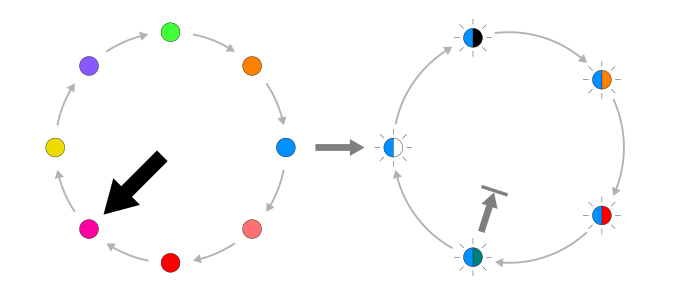
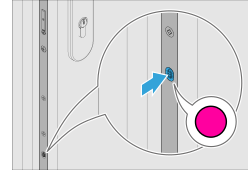
- To change to menu level 1, press and hold down the menu LED button for 8 seconds until it light up magenta and emits an acoustic signal.
- Press the menu LED button until it lights up light blue to proceed to the "Device services" menu.
- Press the menu LED button 3x for versions EA or CA.
- Press the LED button 5x for versions EB or CB.
- Press the menu LED button 5x.
- To change to menu level 2, press and hold down the menu LED button for 3 seconds.
- To start the reference run, press the menu LED button 4x until it flashed light blue and turquoise.
- Hold down the menu LED button for 3 seconds.
- The reference run starts. The drive of the electromechanical multi-point lock moves to the end position.