Coupling SI BUS devices manually
Menu level 1 | Menu level 2 |
|---|---|
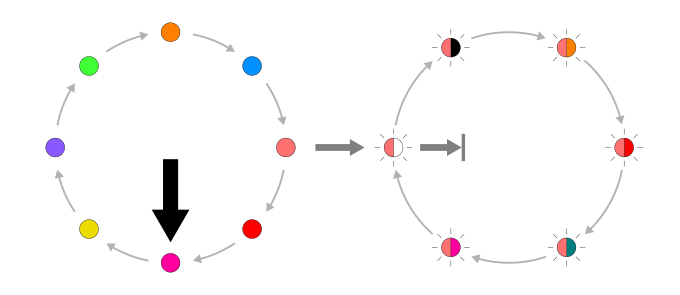 | |
Menu level 1 | Menu level 2 | value |
|---|---|---|
 |  | Couple devices |
 | Separate devices | |
 | Unlock ACS | |
 | Default settings | |
 | WIFI on | |
 | WIFI off |
The "System services" menu can be retrieved up to 30 minutes following the system start. When the time has expired, disconnect the device from the supply voltage and reconnect.
The following digital SI-BUS devices can be coupled:
- SIEGENIA access control system
- IO module/IO module smart
- KNX Gateway
Prerequisites
- A SI BUS device is connected to the drive and the auto-coupling has not been carried out.
Coupling is not necessary for the use of analogue access control systems from third-party providers. - The status LED lights up green.
- The menu LED button lights up white in daytime mode or blue in night mode.
- Press the menu LED button if no LEDs light up.
- To change to menu level 1, press and hold down the menu LED button for 8 seconds until it light up magenta and emits an acoustic signal.
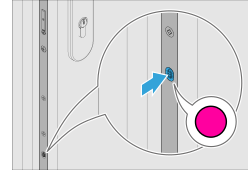
- Press the menu LED button until it lights up light red to enter the "System services" menu.
- Press the menu LED button 4x for versions EA or CA.
- Press the LED button 6x for versions EB or CB.
- Press the menu LED button 6x.
- To change to menu level 2, press and hold down the menu LED button for 3 seconds until it flashes light red and white.
- Hold down the menu LED button for 3 seconds.
- The electromechanical multi-point lock couples itself with a connected SI BUS devices.